300+ Million
TOTAL DOWNLOADS
Search the website

Disk Drill can restore deleted data on your USB flash drive in just a few clicks to bring back everything from accidentally deleted work documents to photos lost due to a file system corruption or formatting. In this guide, we'll show you exactly how to recover deleted files from USB on Mac using this comprehensive flash drive recovery on Mac solution (yes, even if you’re running the lates macOS Tahoe).
USB flash drives are a great way to transfer and store information, but what happens when files stored on them are lost or deleted by mistake, and you have no backup? Usually, the files are still there, and you need capable flash drive data recovery software for Mac to recover them. That's why we recommend Disk Drill. Disk Drill will scan your USB flash drive (also called a pen drive) and find files that have been deleted.
Read on for a quick overview of the steps needed to recover files from a flash drive on macOS. For detailed tutorials, see How to Install Disk Drill and How to Recover Lost Files with Disk Drill Basic in our Knowledgebase...
You can always contact us if you have any additional questions about Disk Drill and its data recovery features.
If you need to recover deleted files from a USB flash drive, first connect it to your computer and check your Mac’s Trash folder. This way, you can make sure that the files are really deleted and take the first step towards flash drive recovery on Mac. If the files are missing, proceed to the following steps for successful data recovery:
Download and install Disk Drill data recovery software for Mac. Avoid performing the download and installation on the device that has experienced the data loss. When recovering from an external device, you can safely use your main hard drive for the installation. Be prepared to provide administrator’s credentials when prompted by the installation procedure.
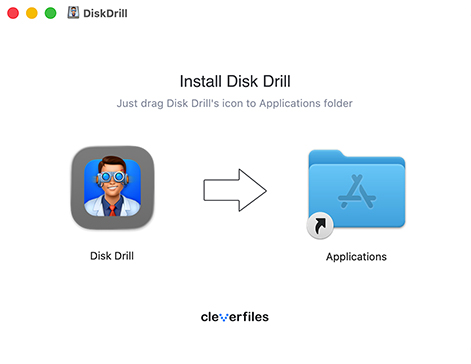
When the installation is complete, connect the USB device to your Mac. Launch Disk Drill and select the USB device from the application’s disk list. It is better to attach the device directly to the computer rather than using a USB hub.
If you find yourself in a situation with a failing USB flash drive, we recommend creating a disk image before attempting a recovery.
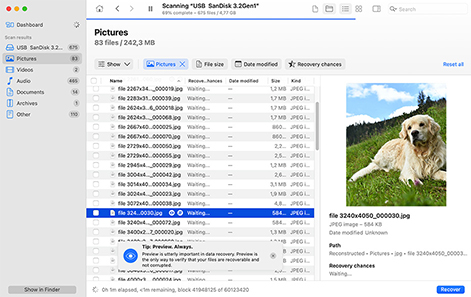
Click the Search for lost data button to initiate the scanning procedures that are at the heart of Disk Drill. Select Universal Scan for most file types, or choose Advanced Camera Recovery (ACR) if you're recovering video files from cameras or dashcams (like from a Tesla). When scanning starts, files begin to populate in different categories, which you can view in real time.

You can pause/resume (or stop) scanning at any time, and you can also choose to let it run in the background so that you can browse recoverable files right away. You can filter the displayed files file type, size, date modified, and more to quickly locate your lost data. The instant preview feature lets you view photos, videos, and documents before recovery to confirm that you're restoring the right files and will be intact after restoration.
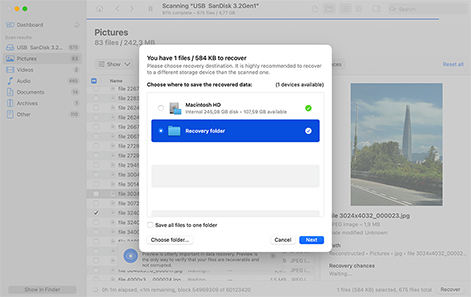
Select the specific files you want to recover by checking their boxes. Then, click the Recover button and choose a safe recovery location (always select a different drive than the affected USB device to avoid overwriting data that might still be recoverable). Alternatively, you can choose Recover All without selecting any specific files to restore everything found during the scan. In either case, click Next to complete the recovery process.
Recovering data with Disk Drill offers users multiple benefits:
 A free trial version that can preview recoverable data before purchasing the full application.Organizes recoverable files into categories like Pictures, Video, Audio, and Documents to speed up selection.Works with USB flash drives, external HDDs/SSDs, memory cards, and any other data storage that can be mounted in macOS.Supports FAT32, exFAT, but also HFS+, APFS, NTFS, ReFS & more.
Disk Drill for Mac can help in many different data loss situations involving USB flash drives, including:

Retrieve files from USB drives formatted using Disk Utility or another formatting tool, as long as the data hasn't been overwritten with zeros or securely erased.

Easily recover files that have been unintentionally deleted from your USB drive even if they're no longer present in Trash or your Time Machine backup.

A corrupted USB drive can seem inaccessible, but if it’s displayed in Disk Utility with the correct size, Disk Drill is capable of locating your data and recovering it to the fullest possible extent.

File system damage and subsequent partition loss don’t stop Disk Drill from recovering lost data because its powerful signature scanning algorithms can find them regardless.

Disk Drill can help if a virus or malware has compromised your files and, for example, made them invisible in Finder (but not if your files have been encrypted).

Connection problems can negatively affect file transfers or file system integrity. Using Disk Drill, you can effortlessly recover any files lost in the process.

Scary file system errors are no match for Disk Drill, whose file signature scanning capabilities allow it to recover data from RAW flash drives.

Disk Drill can salvage data lost due to sudden power interruptions during file transfers or operations.
You can use Disk Drill to recover data from USB devices that use any of the variety of connectors popular with manufacturers. These include USB 1.1, 2.0, and 3.0 as well as the Mini and Micro variants of the connectors.

A, Mini-A, B, Mini-B

A, Mini-A, B, Mini-B, Micro-B

A, B, Micro-B, USB-C
Recover your lost or deleted data from any kind of USB device that connects to your Mac as a data storage device. These are some of the types of USB equipment that can have lost data recovered with Disk Drill:

Patriot®, Kingston®, SanDisk®

Verbatim®, PNY®, Samsung®

Buffalo®, Western Digital®, Adata®

Samsung®, iPhone®, Huawei®

Nikon®, Canon®, Olympus®

Astell & Kern®, JBL®, FiiO®
This Mac USB recovery tool supports recovering over 400 different file types when you run a Deep Scan. You can recover photos, videos, documents, or any other type of data from your USB stick or other external devices.

BMP, TIFF, PSP, JPEG, JP2, GIF. Polaroid/Sigma: X3F. Pentax: PEF. Adobe: AI, APM, IDML, LRCAT, PSB, PSD, INDB, INDD, INDL, INX.

MP3 (MPEG Audio Stream, Layer III), WMA (Windows Media audio files), AIFC, AIF, AIFF (Audio Interchange File)

AVI, FLV (Flash video), MPG (MPEG video), MP4 (MPEG-4 video), M4V (iTunes video), WMV (Windows Media Video)

DMG (Mac OS X Disk Image), RAR (WinRAR Compressed Archive), ZIP (Extended Zip File), CAB (Windows Cabinet File), 7Z (7-Zip Compressed)

XLSX (Microsoft Excel Spreadsheet), DOCX (Microsoft Word), PDF (Portable Document Format), PPTX (Microsoft PowerPoint)

DB (Paradox), OTF (OpenType Font), SQL (bundled SQL queries), ACCDB (Microsoft Database), MYO (MYOB Limited Windows File)
Use awesome possibilities offered by Disk Drill to ensure the safety of your files. Guaranteed Recovery lets you protect your files before something happens. You'll never need to run Mac file recovery from a flash drive again! Guaranteed Recovery creates invisible file copies when files are moved to Trash. Such files will be recovered right away when needed.
Note: Guaranteed Recovery works for files deleted on your Mac. It cannot protect against deletions made on other devices.
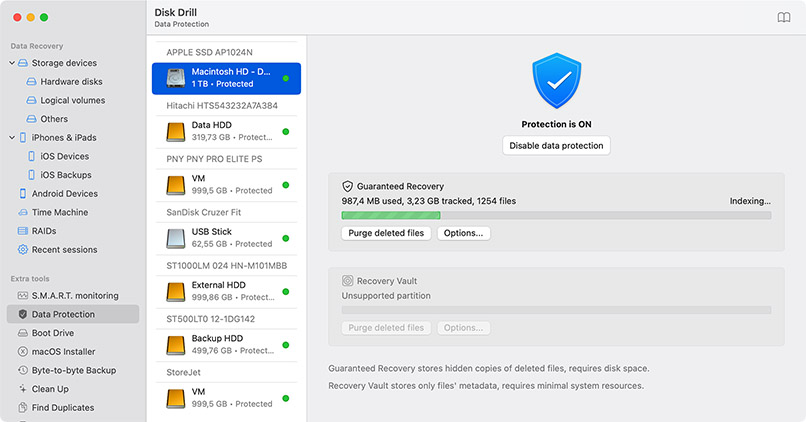
Here are some tips to prevent unexpected data loss on your USB devices. Following these recommendations can help eliminate the need to perform data recovery to restore lost files and folders.

Refrain from reformatting the device unless you are certain that you do not need any of the files or folder it contains.

Make sure your laptop has enough battery power to successfully finish any data transfers that involve USB devices.

You need to be careful when connecting or disconnecting USB devices to your computer to avoid damaging the connections.
Take precautions to prevent physical damage to your device by keeping it away from extreme heat or excessive moisture.

Use a reliable surge protector to guard against power surges that can damage both your USB device and your computer.

It’s always a good idea to make backups of your data. Make it a habit to backup all of your USB devices for added protection.
by Disk Drill Team
First, connect your USB drive to your Mac and check the Trash folder by clicking its Dock icon. If your files are in the Trash, simply right-click them and select "Put Back" to restore them.
If the Trash is empty and you don’t have any backups, you'll need to use USB data recovery software for Mac like Disk Drill.
To do that, install Disk Drill on your system drive, select your USB drive, click "Search for lost data," preview the recoverable files, and restore them to a safe location (not the USB drive as you could overwrite them).
The possibility of recovery depends on the degree of inaccessibility. First, check if your USB drive appears in Disk Utility (Applications > Utilities > Disk Utility). If it's visible there but not in Finder, data recovery software like Disk Drill can likely help you recover files from USB on Mac. However, if the drive doesn't appear in Disk Utility at all (especially if it also shows signs of physical damage), you'll need to contact a professional data recovery service.
While you can check the Trash for recently deleted files and look for backups, macOS doesn't offer native data recovery functionality comparable to specialized software. The Trash only works for recently deleted files that haven't been emptied, and backup tools like Time Machine can help only if you actually do have backups. For permanently deleted files that haven’t been backed up, you'll need dedicated flash drive recovery Mac software to scan for and restore lost data.
First, assess the severity of the corruption. If you notice physical damage (burnt smell, visible damage, unusual sounds) or if the drive doesn't appear in Disk Utility, contact a professional data recovery service immediately. For logical corruption where the drive appears but shows errors, avoid formatting it and use data recovery software instead. Disk Drill is a great choice because its byte-to-byte backup feature can be used to create a complete backup of the corrupted USB drive, and you can then safely recover your lost data from it without risking further corruption.
Open Disk Utility from Applications > Utilities and select your unreadable USB drive from the sidebar (if the drive isn’t listed there, then it’s possibly seriously damaged and not fixable). Run First Aid by clicking the button at the top of the window and confirming when prompted. This tool can fix many common file system errors that make drives unreadable. If First Aid fails or you need to recover data first, use Disk Drill to scan and retrieve your files before attempting any repairs.
Yes, macOS creates a hidden Trash folder on each connected storage device, including USB drives. When you delete files from a USB drive while it's connected to your Mac, they're moved to this hidden folder rather than being immediately erased. You can view these files by clicking the Trash icon in your Dock while the USB drive is connected.
When you delete a file from a USB drive on your Mac, the file is moved to a hidden Trash folder, where it stays until the folder is automatically or manually emptied. While it's still there, you can easily recover it without any software (you just need to connect the drive to your Mac and open the Trash by clicking on its Dock icon). But once the Trash has been emptied, your only recovery option is data recovery software.
You can create a bootable USB drive for Mac with Disk Drill by following these steps:
There are several reasons your USB drive might not appear. First, check your Finder preferences by opening Finder, selecting Settings from the Finder menu, navigating to the Sidebar tab, and making sure "External disks" is checked. Also try different USB ports, as the current one might be faulty. Check Disk Utility to see if the drive appears there but not in Finder. If so, it might need First Aid repairs. For drives that don't appear anywhere, try connecting to another Mac to determine if it's a hardware issue. Sometimes a simple restart can fix USB detection issues.
Connect your flash drive to your Mac and check the Trash by clicking its Dock icon (recently deleted folders often appear there and can be restored by right-clicking and selecting "Put Back"). You might also find the folder in your backups if they exist, of course. However, if the Trash has been emptied or the folder was deleted on another computer, you'll need USB recovery software for Mac like Disk Drill to scan the drive and recover the lost folder with its contents.
The best approach is to protect your data first by creating a disk image using Disk Drill's byte-to-byte backup feature to preserve your drive's current state. If you just need to fix the drive without data recovery, try running First Aid in Disk Utility. If First Aid doesn't resolve the issue but you need your files, use USB data recovery software for Mac to scan and recover your data before considering formatting. After successfully recovering your important files, you can then safely format the drive or consider replacing it if corruption issues persist.
To reveal hidden files on your USB drive, open Finder, navigate to the USB drive, and press Command + Shift + Period (.) to toggle hidden file visibility. This keyboard shortcut will display system files and folders that are normally hidden. Additionally, Disk Drill can help locate both hidden and lost files through its comprehensive scanning algorithms, so it can save the day even when standard methods don't reveal all your data.

REQUIREMENTS
macOS 10.15–26.x, 69.7 MB
Use Disk Drill 1.x-5.x for OS X 10.5+
AVERAGE USER RANK
NEWEST RELEASE

TOTAL DOWNLOADS

PRO CLIENTS

in 160+ countries

I'm recovering data from old hard drives. The software from @Cleverfiles is the best I have found. And even the free version lets you recover files.
Disk Drill is an excellent free file recovery program because of its long list of features and exceptionally simple-to-use interface. - Tim Fisher