


Do you regularly open your iPhone’s Photos app and realize you’re staring at multiple identical or nearly identical shots of your dog, five versions of the same group photo, or endless accidental screenshots you forgot to delete? Maybe you’re also dealing with the “Storage Almost Full” warning and realize that keeping countless duplicates on your device isn’t sustainable. An overcrowded, disorganized photo library is more common than ever, and sorting it all manually can take hours.
There are plenty of iPhone apps that promise to fix the problem, but they vary widely in accuracy, speed, pricing, and how much control they give you. We tested the best photo cleanup apps for iPhone to find the options that are actually useful, then ranked our top 7 based on detection quality, speed, usability, and the real value of their free versions.
See how we test →
Do You Still Need a Duplicate Photo Remover App if iPhone Has a Duplicates Tool?
Since iOS 16, iPhones have had a built-in Duplicates album that can find and merge or delete duplicate photos, so why download a third-party duplicate photo remover app in the first place?
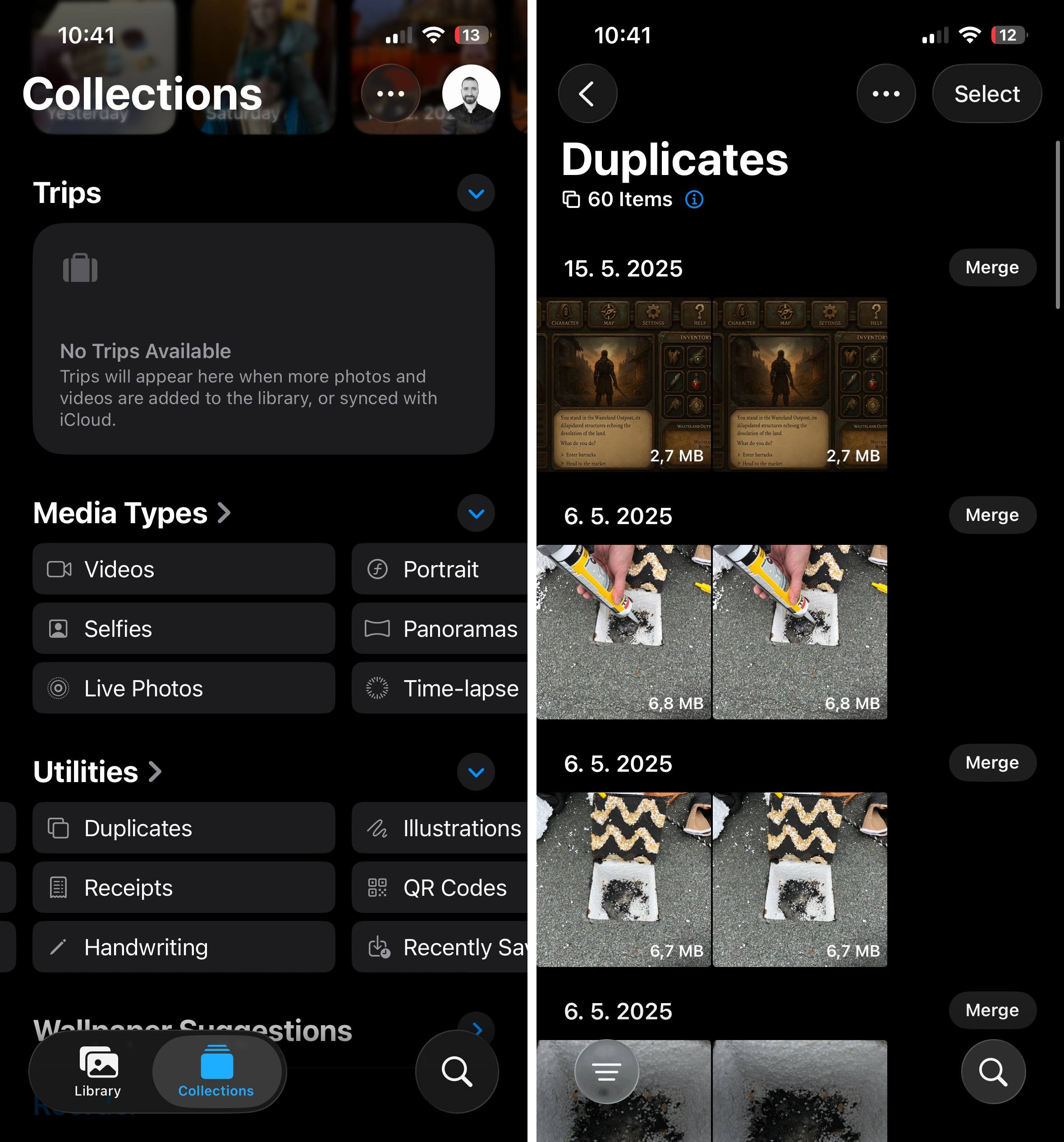
The built-in Duplicates album is useful for merging duplicate photos, but modern iPhone libraries contain far more than exact copies. Near-identical selfies, screenshots, Live Photos, large videos- it all can pile up quickly and make your gallery harder to manage.
That’s where a good photo cleaner can make a difference. Many apps use AI to group visually similar shots, help you choose the strongest photo from each set, surface large files, and even compress videos or Live Photos without forcing you to delete everything. Some also make manual cleanup faster by organizing your library into clear categories instead of leaving you to review thousands of items one by one.
The best photo cleaner apps are absolutely worth keeping around for regular maintenance, and after trying many ourselves, it’s become easy to see exactly why. Below, we’ll explain how each one can make managing your iPhone photo library easier.
Top 7 Apps to Delete Duplicate Photos on iPhone
We tested dozens of apps to find the best duplicate photo finder for iPhone, and these seven stood out. Each review below covers the key features, what worked well in our testing, and any limitations we noticed. This section is structured as a concise highlight reel that gets straight to the point since you can always check the full feature list on each app’s App Store page.
1. Clever Cleaner: AI CleanUp App
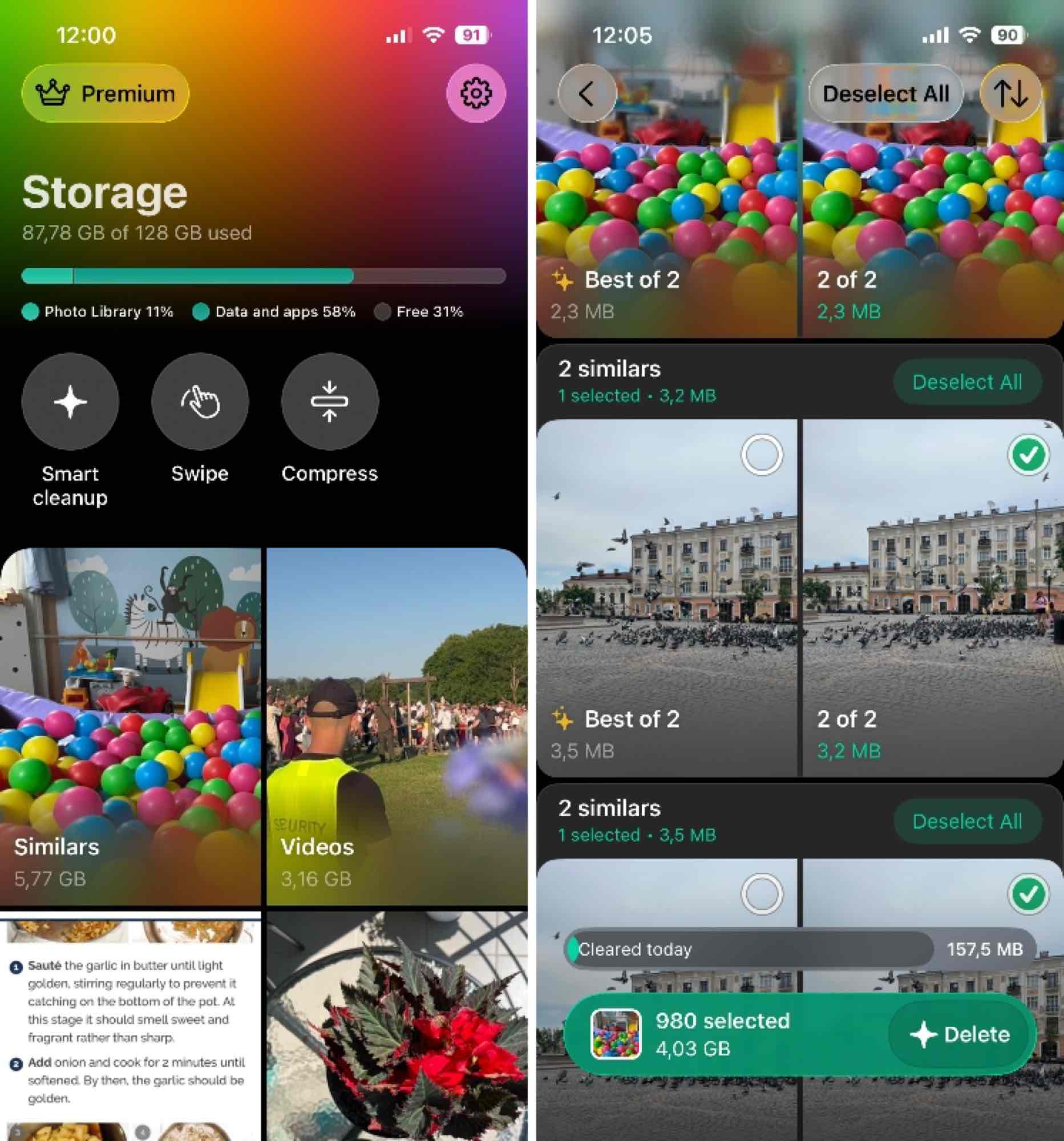
Clever Cleaner is the best duplicate photo finder for iPhone we tested thanks to its accurate similar-photo detection, fast scanning, and additional cleanup tools.
Even if your photo library is very large (10,000+ photos), you can expect Clever Cleaner to scan it in less than 5 minutes.
The duplicates can be reviewed in Similars. You can either go through them manually or click the Smart Cleanup button on the main screen and let the app’s smart algorithms automatically handle the cleanup for you. (Smart Cleanup lets you select categories that can usually be cleaned without item-by-item review – removing redundant similar shots, compressing screenshots and Live Photos. In practice, it’s a quick way to get rid of a large chunk of unnecessary storage.)
More cleaning can be done directly from the main screen, where Clever Cleaner organizes your library into categories such as Live photos, Videos, Screenshots, and shows how much storage each one takes up.
The Compress tool is useful for media you want to keep but don’t need at its original size. It can shrink videos, Live Photos, photos, and screenshots to reclaim space without deleting them.
There’s also Swipe, which stands out because it’s designed for manual review. Photos are organized chronologically, and you simply swipe left to delete or right to keep. This gives you complete control, allowing you to review everything yourself instead of relying on AI suggestions. It’s fast, intuitive, and honestly kind of addictive once you get into a rhythm, which is especially useful when you need to pick the best shots after a photo session.
- Generous free version (plus unlimited Swipe mode)
- Fast scanning even on large photo libraries
- AI accurately detects both exact duplicates and similar-looking photos
- Manual Swipe mode gives you full control over deletions
- Compression for videos, Live Photos, photos, and screenshots
- Clean interface with no ads or pushy upsells
- Works smoothly on older iPhone models that support iOS 16 or later
- Identifies and organizes screenshots, Live Photos, and large files
- iPad version runs in compatibility mode (not fully optimized for tablet use yet)
💰 Pricing: Clever Cleaner is free to use with a generous daily cleanup allowance and unlimited Swipe. An optional Pro version has no limits, with subscription and lifetime options available.
2. Cleaner Guru: Clean Up Storage
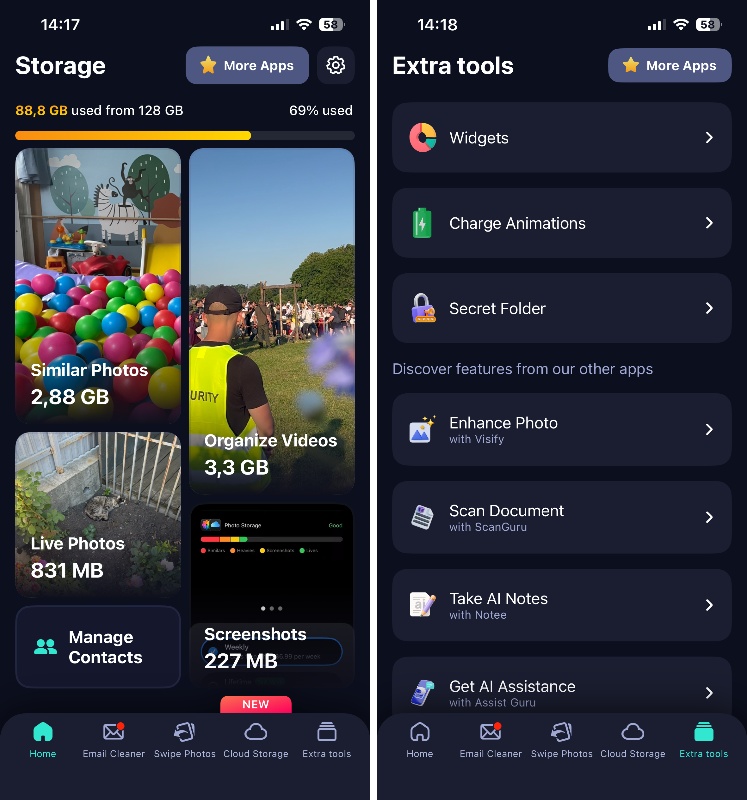
Cleaner Guru is a solid all-around best photo cleanup app for iPhone that’s designed as a full storage optimization tool, but its duplicate detection features are what we’re focusing on here.
During testing, Cleaner Guru caught both exact duplicates and near-matches with impressive accuracy, grouping photos intelligently and automatically selecting the best version from each set while marking the rest for deletion. It’s one of the better detection algorithms we’ve seen.
Being a general-purpose cleanup app, the interface can feel cluttered with so many features competing for attention, and it’s not immediately obvious what to tackle first when you open the app.
Beyond duplicates, Cleaner Guru offers a Swipe Photos mode that lets you manually review your entire library using more or less the same Tinder-style gestures as Clever Cleaner. The video management section sorts your library videos by file size, and there’s also a built-in compression tool (found within the video organization menu, which isn’t immediately obvious) that reduces file sizes without noticeable quality loss.
Cleaner Guru extends its cleanup tools to contacts and email too. You can merge duplicate contacts, delete incomplete entries, and even unsubscribe from email newsletters in bulk while deleting all messages from specific senders. These features work as advertised, though the contacts tool could be more intuitive. The app even includes widgets for monitoring storage and battery usage, plus a Secret Folder for password-protecting private photos.
- Comprehensive coverage: photos, videos, contacts, and email cleanup
- Swipe mode for manual photo review gives full control
- Video compression tool preserves quality while freeing up space
- Email cleaner unsubscribes and deletes messages in bulk
- Handles large photo libraries smoothly
- Aesthetically pleasing interface
- Expensive subscription model with no monthly option
- Interface feels cluttered; not immediately clear what to do first
- Some tools aren't obviously placed (e.g., compression is hidden in video menu)
- Extra features like charging animations feel unnecessary
💰 Pricing: 7-day free trial with automatic subscription activation. After trial: $7.99/week or $39.99/year. You must cancel at least 24 hours before trial ends to avoid charges.
3. CleanMy®Phone: Cleanup Storage
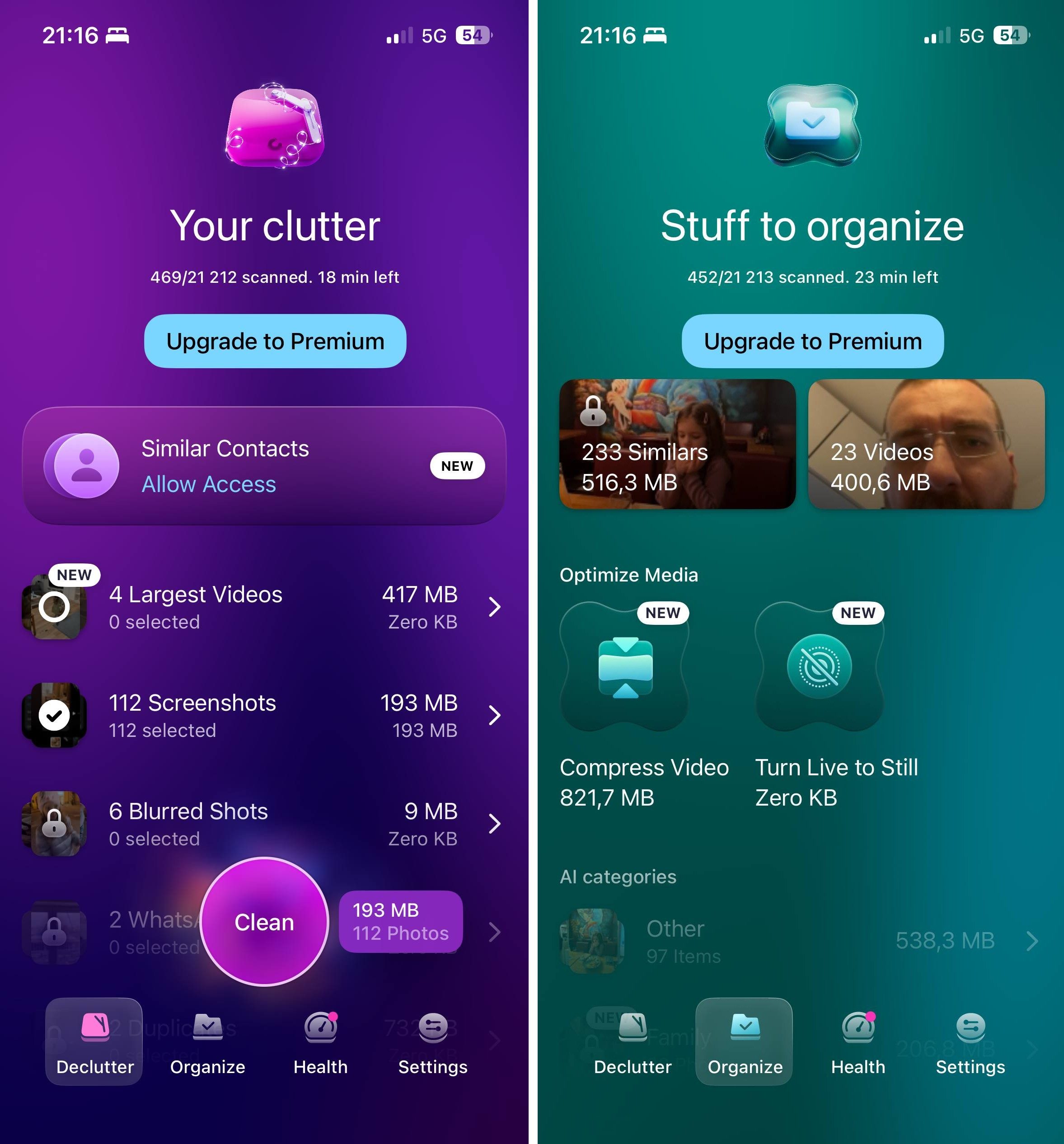
CleanMy®Phone comes from MacPaw, the developer behind CleanMyMac, a well-known macOS optimization tool known for its great user interface design. It’s no surprise then that this is easily one of the most beautifully designed best duplicate photo finder for iOS apps we’ve tested. The animations, transitions, and overall layout feel premium in every way.
CleanMy®Phone offers automatic cleanup with one-tap functionality, and it visually breaks down the scanning process so you can see exactly what it’s working on in real time. The scan itself is incredibly fast, so you won’t be sitting around waiting for it to finish for too long.
The duplicate and similar photo detection works decently most of the time. The AI groups photos into clear categories and correctly identifies many duplicates and near-matches. However, we noticed occasional misgroupings where the app lumped together photos of different people or poses, which means you can’t always trust the bulk selection.
Another issue is that CleanMy®Phone doesn’t show total recoverable storage in one place. Instead, you have to check different sections individually, which feels disjointed and makes it hard to gauge how much space you’re actually saving. For a storage cleaner, not knowing exactly how many gigabytes you can recover is a significant oversight.
The app includes some extra features like blurred image detection, screenshot cleanup, email and contact cleanup tools, AI-based photo organization by location/event, video compression, and Live Photo compression. Quite a feature set.
- Stunning, premium interface (best-in-class design)
- Automatic cleanup option with visual feedback
- Smooth, responsive gestures and navigation
- Drag-and-drop photo preview functionality
- Email cleanup tools
- Similar-contact detection and merging
- Pause and resume scanning
- Blurred image and screenshot detection
- AI photo organization by categories
- Very expensive subscription pricing
- Free version is extremely limited (barely functional)
- Doesn't show total recoverable storage in one clear view
- AI occasionally misgroups photos (different people/poses lumped together)
- Not all clutter can be removed automatically
- Requires manual review of selections to avoid mistakes
💰 Pricing: Free version with severe limitations (screenshots and basic cleanup only). Paid plans: $9.99/month, $49.99/year, or $99.99 lifetime license.
4. Hyper Cleaner: Clean Up Photos
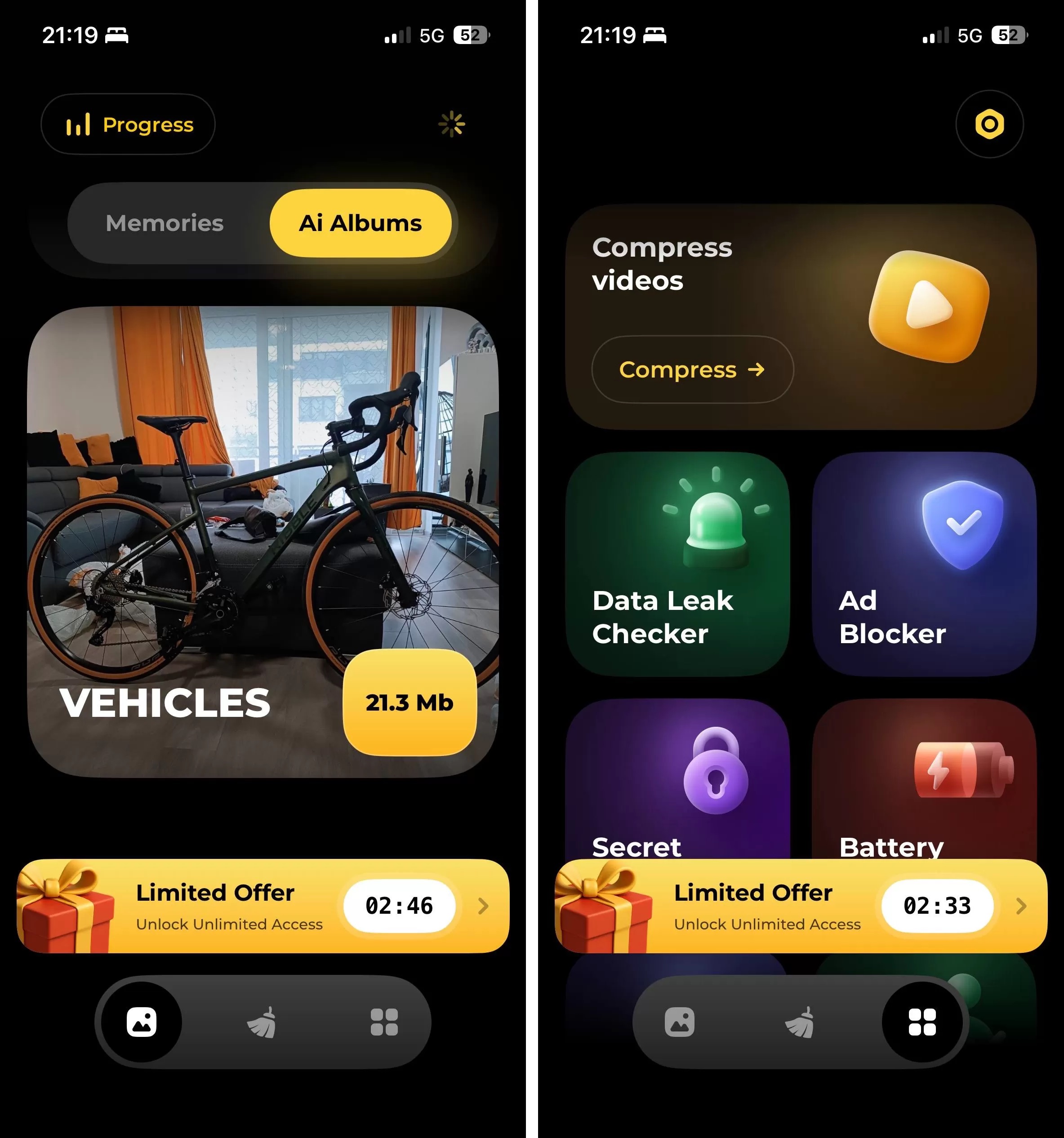
Hyper Cleaner attempts to turn photo cleanup into a daily ritual. The app’s signature “Memories” feature organizes your library by months and days. It then serves up photos from the past so you can reminisce while decluttering. Each day, you get a selection of photos from that date in previous years, and you can swipe left to delete or right to keep.
The duplicate detection worked reasonably well at identifying exact copies and similar-looking shots during our testing. The AI automatically selects what it thinks is the best version from each group, which saves time if you trust its judgment. However, we noticed the interface felt a bit sluggish at times, and based on user reviews across the App Store, reliability issues have been a recurring complaint.
Hyper Cleaner offers a nice selection of extra features. It identifies blurry images, finds forgotten screenshots cluttering your library, and includes video compression to shrink large files without noticeable quality loss. The app also throws in extras like an ad blocker, a secret folder for sensitive files, contact organization tools, and a battery widget.
- Unique 'Memories' feature for daily photo review and cleanup
- Decent duplicate and similar photo detection
- Blurry image identification
- Video compression to reduce file sizes
- Screenshot finder and bulk deletion
- Includes extras: ad blocker, secret folder, contact organizer, battery widget
- 3-day free trial to test functionality
- User reports of crashes during deletion process
- Some users report delete button not working (endless loading)
- App can feel sluggish during use
- Subscription required after trial (not a truly free option)
- Mixed reliability based on user feedback
💰 Pricing: 3-day free trial, then $3.99/week, $4.99/week (alternate pricing), $29.99 for Premium.
5. Boost Cleaner – Clean Up Smart
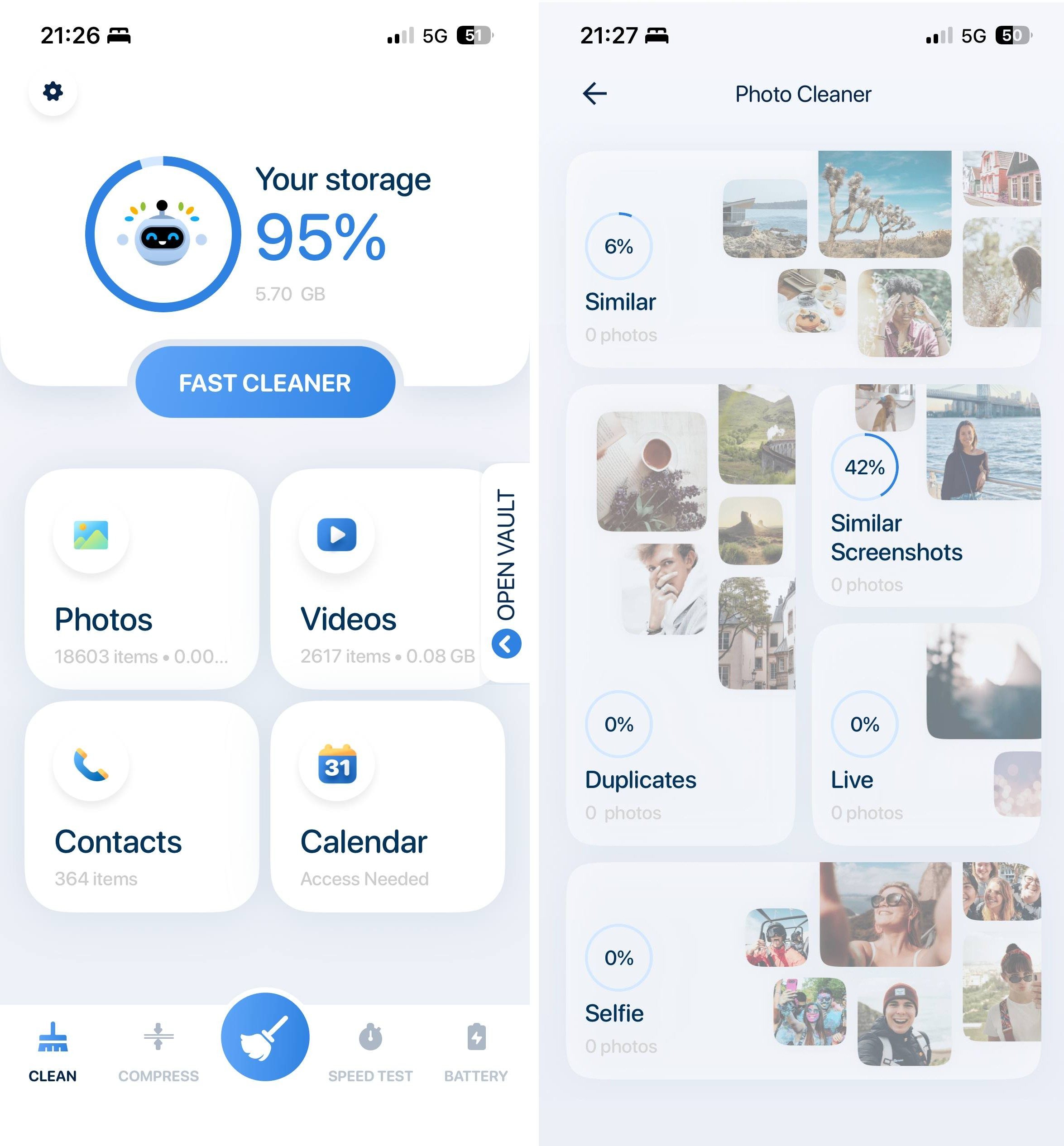
Boost Cleaner covers the basics (duplicate photo detection, contact management, and general storage cleanup) without trying to be flashy or overloaded with features.
The app to delete duplicate photos worked reasonably well when we tested it, though the results weren’t as comprehensive as what we saw with top performers like Clever Cleaner or Cleaner Guru. Boost Cleaner successfully identified obvious duplicates and some similar-looking photos, but it missed others that competing apps caught. The detection algorithm feels more conservative, which means you’re less likely to accidentally delete something important.
Finding the duplicate scanner and initiating a scan takes just a few taps, and the app organizes results into clear categories: duplicate photos, similar selfies, Live Photos, and GIFs. You can also filter photos by date and location, which is handy if you’re trying to clean up specific events or trips.
In addition to duplicate cleanup, Boost Cleaner includes compression tools for both photos and videos. You can choose between different compression levels depending on whether you want to preserve more quality or free up as much storage as possible. The app also offers contact management tools that let you merge duplicate contacts, delete incomplete entries, and back up your contact list.
- Simple, easy-to-use interface
- Decent duplicate and similar photo detection
- Filters photos by date and location
- Photo and video compression with multiple quality levels
- Contact cleanup with merge and backup features
- General storage cleaner for large files
- Secret album and private browser included
- Processes all data locally (strong privacy)
- Duplicate detection misses some photos that competitors catch
- User reports of technical glitches and crashes
- Subscription management complaints from users
- No one-time purchase option (subscription only)
- Not as thorough as top-tier apps
- Mid-range pricing for mid-range performance
- Can't test it without activating the 3-day free trial
💰 Pricing: 3-day free trial with full access to all features. After trial: $6.99/week, $14.99/month, or $49.99/year.
6. Cleanup: Phone Storage Cleaner
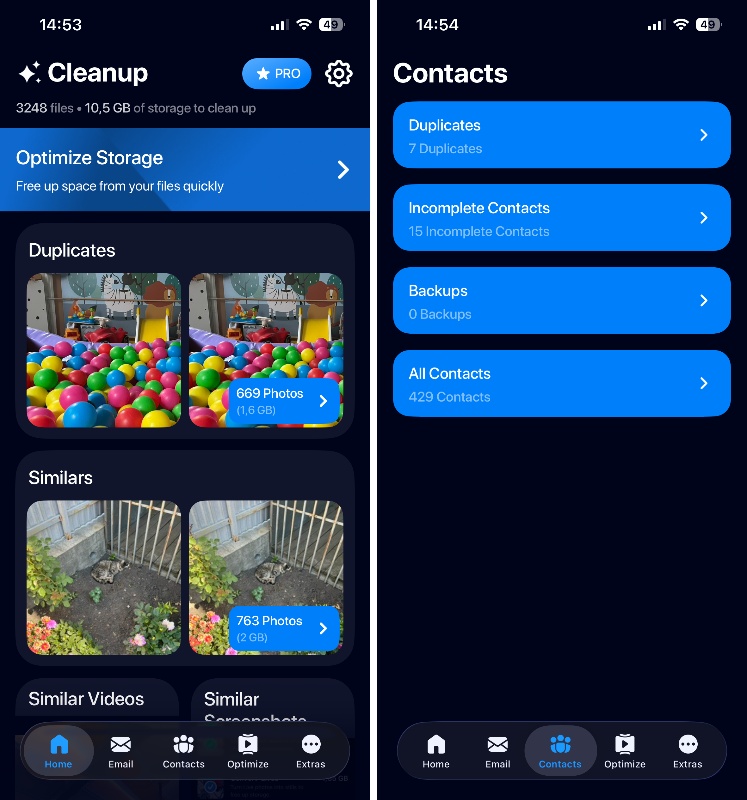
Developed by Deep Flow Software Services, Cleanup: Phone Storage Cleaner covers photos, videos, contacts, and even email cleanup, so it’s a true all-in-one storage solution.
When using it as an app to delete duplicate photos, Cleanup: Phone Storage Cleaner automatically selects duplicates for deletion, though you can review each set individually if you want more control. The detection algorithms perform well, but we’ve noticed misclassifications.
For a more automated approach, the Optimize section can compress videos and convert Live Photos into still images in just a few taps. Nothing important has to be deleted, yet you can still reclaim a noticeable amount of storage.
The interface looks clean and modern, but the user experience could use improvement. For example, the swipe-to-sort feature (swipe left to delete, right to keep) isn’t immediately obvious. You only discover it through a pop-up notification. Once you know it’s there, it works smoothly across different sections.
The email cleaner part of the app can recognize spam, promotions, updates, and other junk mail. You can preview full emails before deleting them, and the categorization is genuinely helpful for bulk cleanup. The contacts cleaner lets you merge duplicate entries and delete incomplete contacts, with a preview of the merged result before you commit.
- Comprehensive all-in-one tool (photos, videos, contacts, email)
- Advanced email cleaner with automatic categorization and filters
- Video compressor with adjustable quality settings
- Swipe gestures throughout the app for quick sorting
- Contact cleanup with merge preview
- Live Photos converter
- Clean, modern interface
- 7-day free trial with full feature access
- User experience needs improvement (features not immediately obvious)
- Limited subscription options (only weekly and yearly)
- Extra features like charging animations feel like bloat
- No unsubscribe feature in email cleaner
- Mid-range pricing without flexible payment options
💰 Pricing: 7-day free trial with automatic subscription activation. After trial: $11.99/week.
7. Remo Duplicate Photos Remover
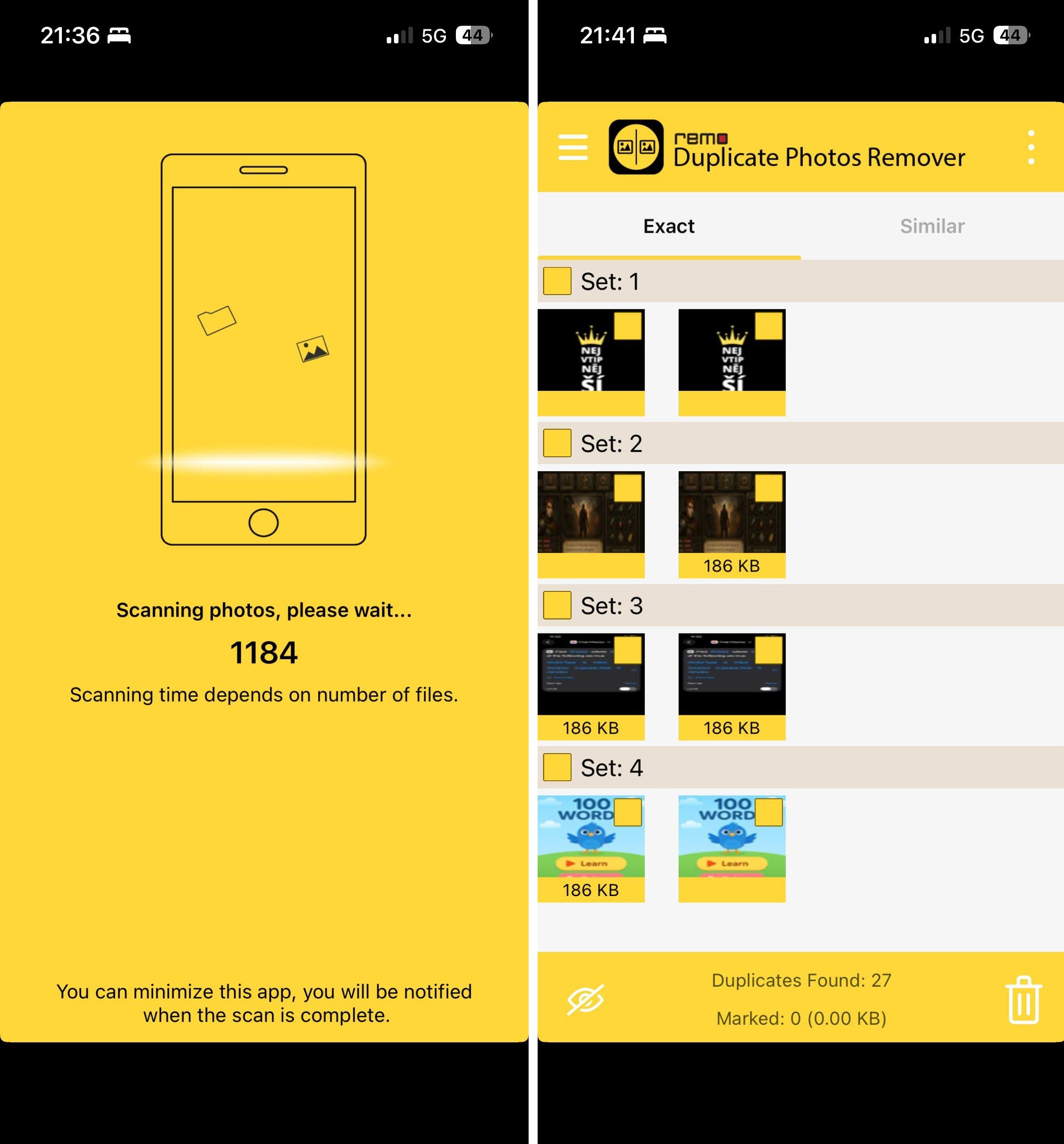
Remo Duplicate Photos Remover is clearly different from everything else on this list. The interface looks dated, the feature set is bare-bones, and there are no flashy extras or modern design elements. Despite these downsides, we’re convinced that it’s worth recommending because it’s a genuinely free app to remove duplicate photos on iPhone with no hidden costs, and it still works on very old iOS versions.
The app scans your library and organizes results into two categories: “Exact” duplicates (pixel-perfect matches) and “Similar” duplicates (photos that look alike but aren’t identical). It then automatically marks duplicates for deletion and saves what it considers the best version from each group, though you can manually adjust selections if you disagree with its choices.
It’s worth noting that Remo sometimes miscategorizes exact duplicates as “similar” duplicates. It’s not a dealbreaker, but it means you’ll want to review both categories to make sure you’re catching everything.
Remo includes some useful tools like photo preview, image details viewer, and the ability to mark or unmark individual photos or entire groups. That said, there’s no ability to compress videos, no swipe gestures for manual review, and no additional storage management features.
- Completely free with no subscriptions or in-app purchases
- No ads or upsell attempts
- Works on very old iOS versions (iOS 9 and above)
- Simple, straightforward interface with no learning curve
- Organizes duplicates into 'Exact' and 'Similar' categories
- Very slow scanning compared to competitors
- Dated, bland interface (feels like an app from 2015)
- Only handles duplicate photos
- Sometimes miscategorizes exact duplicates as similar
- No swipe gestures or modern UI elements
- Limited metadata display for detail-oriented users
💰 Pricing: Completely free. No trial period, no subscriptions, no hidden costs. Just download and use.
How We Made Our List of the Best Duplicate Photo Finders for iPhone
We didn’t just download a handful of app to delete similar photos and call it a day. Our testing process involved scanning real iPhone libraries with thousands of photos across multiple devices, ranging from newer models to older iPhones.
So what separated the winners from the apps we left out? Four main criteria shaped our selection:
- 🎯 Detection accuracy was the most important factor. An app to delete similar photos needs to actually find them, obviously. We looked at how well each app caught exact duplicates (the easy part) and similar-looking photos (where most apps struggle). Apps that missed obvious duplicates or flagged completely unrelated photos as “similar” didn’t make the cut.
- ⚡ Scan speed also mattered. Some apps took a really long time to scan a 10,000-photo library, while the best performers finished in under five minutes. With that being said, we didn’t automatically disqualify slower apps (Remo Duplicate Photos Remover is notably slow but still made the list) since most people don’t mind waiting if the wait is worth it.
- 🆓 Free version or trial availability was another major factor. If an app charged $40/year but offered zero way to test it first, that’s a dealbreaker for most people. We prioritized completely free apps that remove duplicate photos without limitations or at least generous trial periods that let you test all features before committing. Apps with severely limited free versions or deceptive “free trials” that auto-charge after 24 hours got dinged in our scoring.
- 🧭 Interface and usability rounded out our evaluation. If an app required a tutorial just to figure out where the scan button was located, that’s a problem. We looked for clean, intuitive layouts where features were easy to find and navigation felt natural. Also, apps with smooth animations and responsive gestures scored higher than clunky, outdated interfaces.
We also considered extra features like video compression, contact cleanup, and email management, but these were bonuses rather than requirements. An app could still earn a top spot by excelling at duplicate detection even without bells and whistles.
So, What’s the Best Photo Cleaner App for iPhone?
If you’re here for the short answer: the best app to delete duplicate and similar photos on iPhone is Clever Cleaner. If you haven’t decided yet and need more context, here’s a quick comparison table that breaks down how each app performed in our testing. We scored each one based on four key factors: detection quality (how well it finds both exact and similar photos), scanning speed, free version availability, and interface design.
| App | Detection Quality (Exact + Similar) | Scanning Speed | Free / Trial | Interface | Total Score |
| 🥇 Clever Cleaner | 5 | 5 | 5 | 5 | 20 |
| 🥈 Cleaner Guru | 5 | 4 | 3 | 4 | 16 |
| 🥉 CleanMy®Phone | 4 | 5 | 2 | 4 | 15 |
| Hyper Cleaner | 3 | 4 | 3 | 4 | 14 |
| Cleanup: Phone Storage Cleaner | 4 | 4 | 3 | 3 | 14 |
| Boost Cleaner | 3 | 4 | 2 | 3 | 12 |
| Remo Duplicate Photos Remover | 3 | 1 | 5 | 3 | 12 |
Clever Cleaner is clearly the winner because it earned perfect scores across all categories, which is something no other photo-deleting app has been able to achieve.
If Clever Cleaner doesn’t meet your specific needs for some reason, Cleaner Guru and CleanMy®Phone are solid runners-up. Both offer excellent detection quality and fast scanning, but their free versions have some limitations.
Remo Duplicate Photos Remover ranks as the worst of the best photo cleanup apps, but it’s actually the only other app that deletes duplicate photos for free besides Clever Cleaner. It also runs on very old versions of iOS, so it’s worth considering if you’re on a tight budget or running an older iPhone model.
FAQ
For most users, downloading a third-party iOS app to delete duplicate photos is the better choice. Apple’s built-in tool only catches exact duplicates and takes days to index new photos, which means it often misses the bulk of storage-hogging images sitting in your library. On the other hand, third-party apps scan your entire photo collection immediately and use smart algorithms to detect similar-looking photos.
If you’re dealing with a massive library, you’ll want the best photo cleanup app that can handle large volumes of images without taking forever to scan or even freezing. Clever Cleaner consistently performed best in our tests. It surprised us with its fast scans, excellent accuracy, and best-in-class usability, so we recommend it as the best photo cleaner app for large libraries.
No, due to iOS restrictions, photo-deleting apps send deleted images to your iPhone’s Recently Deleted album first. This gives you 30 days to recover anything you removed by mistake before the photos are permanently erased.
Yes, pretty much every app that helps you delete photos on our list, including our top pick Clever Cleaner, works on older iPhone models, though minimum iOS requirements vary. Most apps on our list require iOS 16 or iOS 17, so you’ll want to check compatibility before downloading. Remo Duplicate Photos Remover is the exception because it supports devices running iOS 9 and up; it’s one of the few options for really old iPhones.
Yes, you can use many apps to get rid of duplicate photos that are stored in iCloud as long as you’ve downloaded your full library to your device or enabled “Optimize iPhone Storage.” When you delete duplicates with this option enabled, the changes will sync to iCloud automatically, and free up storage across all your devices.
