Key Definitions (Quick Primer)
- Hardware (physical) disk / device. The actual storage hardware you can hold in your hand: internal SSD/HDD, external USB drive, NVMe, SATA SSD, memory card, etc. It exposes blocks/sectors (typically 512B or 4096B logical sectors).
- Partition map / partition table. The low‑level map on a disk that defines where partitions live: GPT (modern), MBR (legacy). On Macs, GPT is standard.
- Logical drive / volume. A storage construct that lives on top of a device (or multiple devices). Examples: APFS or HFS+ volumes on macOS; NTFS/FAT/exFAT volumes on Windows; RAID/LVM/Storage Spaces virtual volumes; encrypted containers. A single physical disk can host several volumes. Conversely, one logical volume can span multiple physical disks (e.g., Fusion Drive, dynamic/pooled volumes). On macOS with APFS, volumes share space inside a container instead of using fixed‑size partitions.
- File system. The structure that stores files/folders on a volume (APFS, HFS+, NTFS, exFAT, FAT32, etc.).
Download Disk Drill data recovery app
Download now
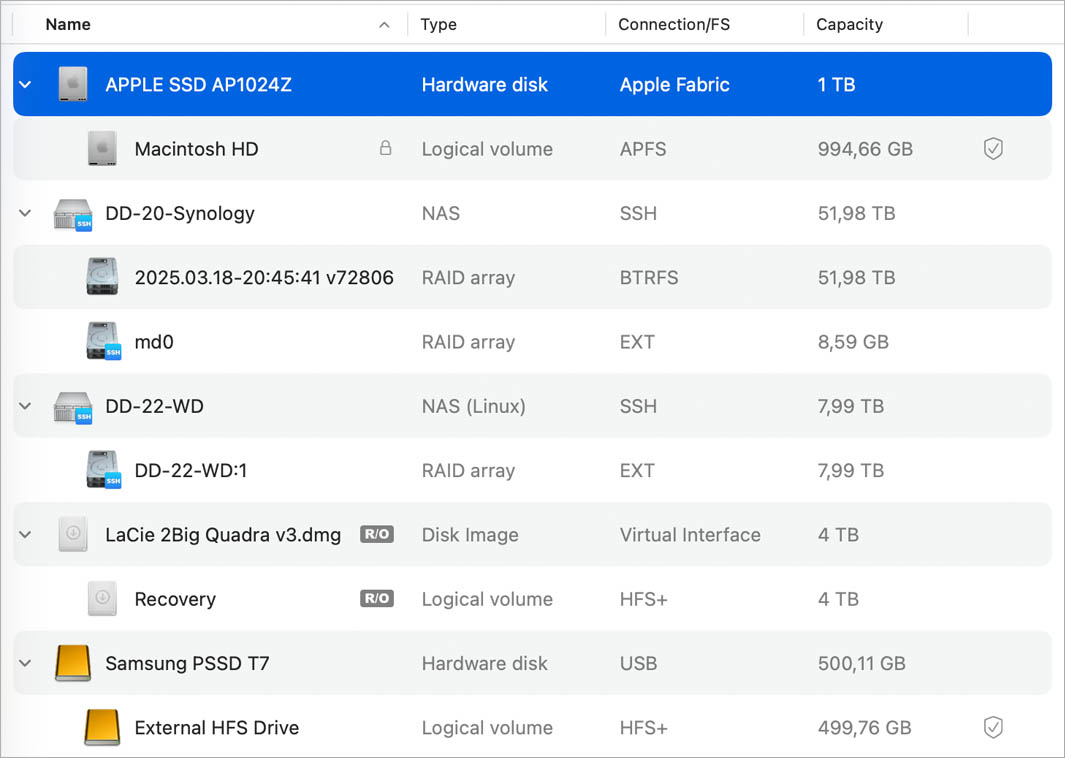
How Disk Drill Represents Devices vs. Volumes (Icon Guide)
1) Native OS Icons (Default)
Disk Drill adopts the same icon you’d see in your OS:
- macOS examples: internal vs. external vs. removable disk icons. For instance, Finder commonly shows orange icons for external disks and white for removable devices; Disk Drill mirrors that behavior.
- Windows examples: drive icons for fixed, removable; BitLocker/volume states may appear with OS‑provided overlays.
2) When Disk Drill Uses Custom Icons
Disk Drill introduces a small, neutral set of custom icons only when:
- The OS doesn’t supply a meaningful icon for the target (e.g., certain RAW/uninitialized devices, reconstructed/lost partitions, or composite sources).
- The item is Disk Drill–specific, such as Byte‑to‑Byte Backup images (backup files default to the
.ddor.dmgextension)


ℹ️️ Goal of the design: Reduce cognitive friction by matching Finder/Explorer wherever possible—then add minimal, consistent custom visuals only for edge cases and Disk Drill–specific features.
.updated: October 30, 2025 author: