

GoProRecovery & CnW Recovery Are Now Part of Disk Drill
The specialized video reconstruction technology you relied on is now built into Disk Drill’s Advanced Camera Recovery module – more powerful, actively supported, and easier to use than ever before.
Available for macOS and Windows
Already own a GoProRecovery or CnW Recovery license?
Click here to learn about your free upgrade


CleverFiles and CnW are officially joining forces
In early 2024, we announced our partnership with CnW Recovery Developments. After a period of intensive development and integration, we’re excited to confirm that the transition is complete. GoProRecovery and CnW Recovery are now discontinued and will no longer receive updates or support.
But there’s great news for fans of these tools and anyone discovering them for the first time: Disk Drill has evolved into a far more advanced solution, incorporating the best algorithms from both products while adding years of additional improvements, modern features, and cross-platform support.
What You Gain by Switching to Disk Drill
| Feature | Disk Drill | GoProRecovery | CnW Recovery |
|---|---|---|---|
| Active Development & Support |
Regular updates with new features, bug fixes, and camera support
|
No updates since 2022
|
Discontinued, no support
|
| Operating System Support |
Windows & macOS (including Apple Silicon)
|
Windows only
|
Windows only
|
| Modern User Interface |
Clean, intuitive, modern design with guided workflows and preview feature
|
Functional but outdated Windows-only interface
|
Very basic, dated interface
|
| Fragmented Video Recovery |
Advanced Camera Recovery module built on GoProRecovery algorithms, enhanced with years of iterative improvements.
|
Original technology (no updates since 2022)
|
Not available
|
| Supported File Types |
Almost 400 file signatures including
|
Limited to video formats:
|
Very limited:
|
| File System Support |
|
|
|
| Additional Features & Modules |
|
None
|
None
|
How to Use Disk Drill to Recover Your Lost Videos and Other Data
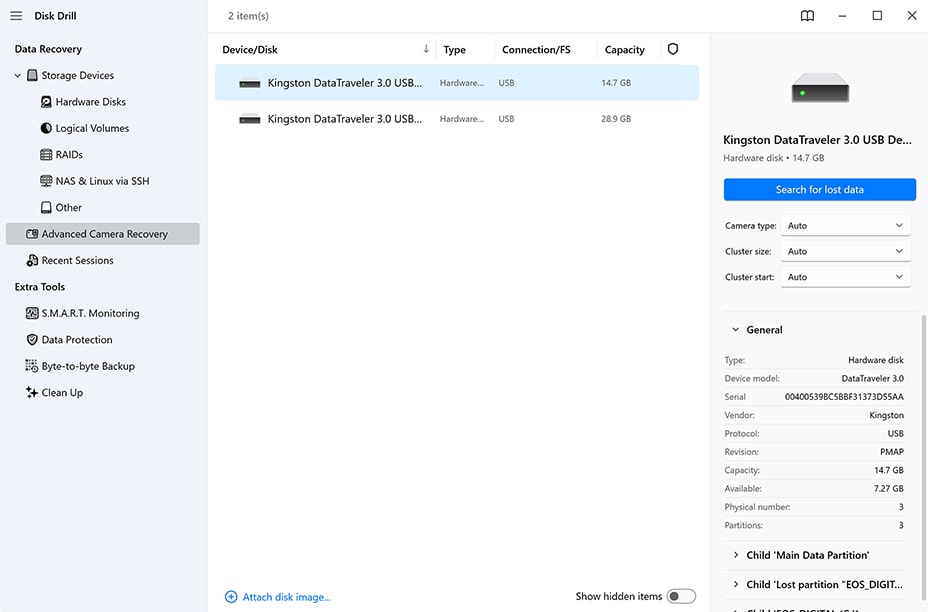
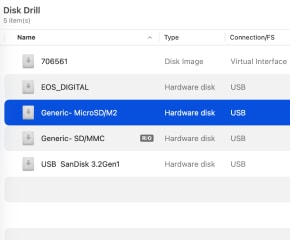
Launch Disk Drill and choose the storage device containing your lost GoPro or camera footage.
Whether it’s an SD card, external drive, or internal storage, Disk Drill automatically detects all connected devices and displays them in an easy-to-navigate interface.
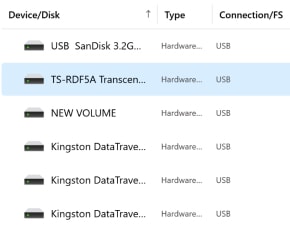
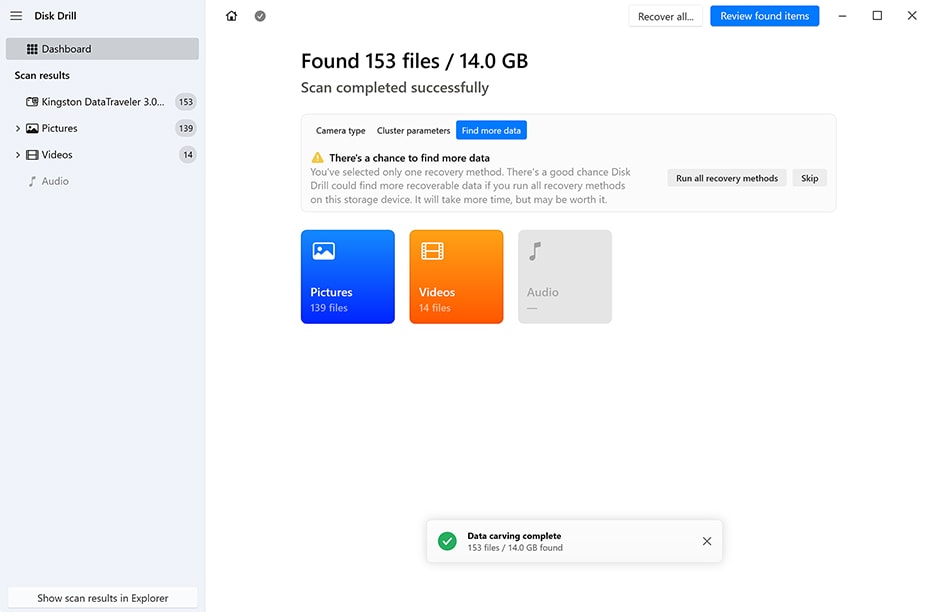
Select your device and click “Search for lost data” to begin. For non-system drives, Disk Drill will offer you a choice between Universal Scan and Advanced Camera Recovery – select Advanced Camera Recovery for the best results with fragmented videos.
You can also run the ACR scan from the sidebar menu item for applicable storage devices.
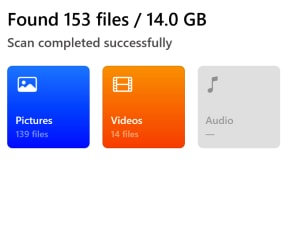
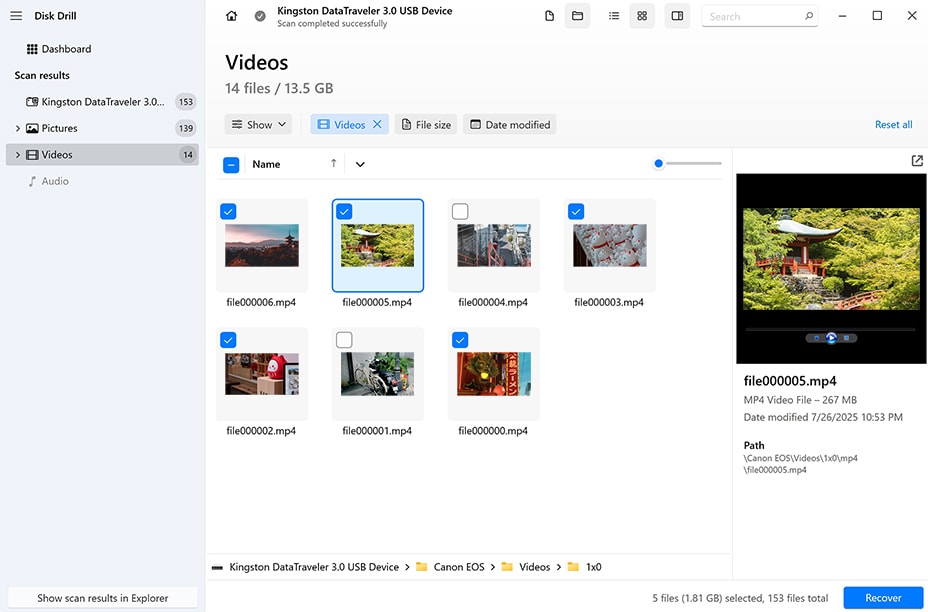
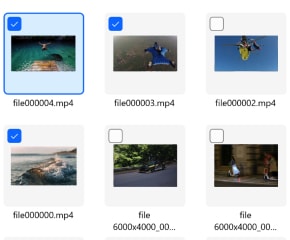
Once scanning completes, use the file type filters to locate your videos quickly. Disk Drill lets you preview recoverable footage before saving – note that preview availability depends on Windows native support (MP4 files will show a full player, while MOV files may only display a still image).
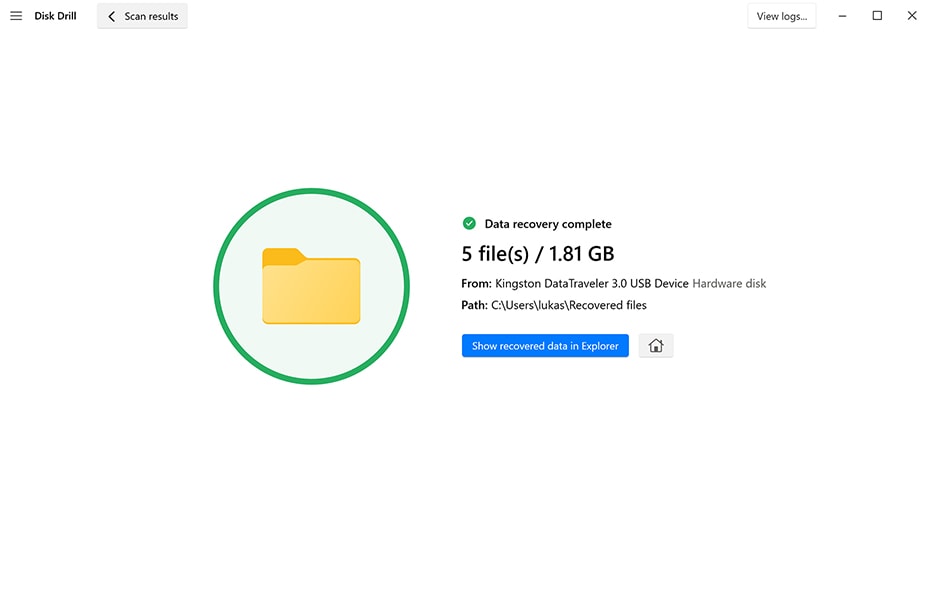
Select the files you need, click “Recover,” and choose a safe location on a different drive. Your precious moments are restored in minutes.
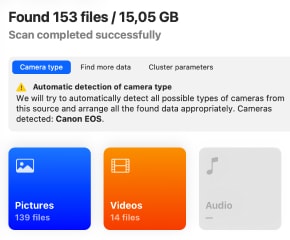
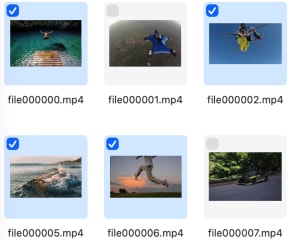
An important reminder to act fast: the longer you wait, the greater the chances your data is no longer recoverable.
Trusted by Data Recovery Professionals and Camera Users Worldwide
“CnW got bought by Clever Files. I think the GoPro Recovery is still around. If they actually implement CnW’s algorithms in Disk Drill, it will become a lot smarter in a lot of the ways it’s weak.”

“The new version of Disk Drill 6 is the best thing for GoPro recovery these days. You need to use the “Advanced Camera Recovery” menu. Most other recovery software will fail due to the fragmented nature of GoPro video.”
“I have recovered plenty of video with DD6 that the other tools wouldn’t.”
FAQ
Why was GoProRecovery/CnW redirected here?
In January 2024, CleverFiles (makers of Disk Drill) acquired CnW Recovery Developments Ltd., the company behind GoProRecovery and CnW Recovery. After completing the technical integration of their advanced video reconstruction algorithms into Disk Drill, the standalone products have been discontinued. All users are now directed to Disk Drill, which offers superior capabilities.
Is GoProRecovery discontinued?
Yes. GoProRecovery and CnW Recovery are no longer sold or supported as standalone products. However, the technology hasn’t disappeared – it’s been enhanced and integrated into Disk Drill’s Advanced Camera Recovery module, which offers better performance, ongoing updates, and cross-platform support.
Is this the same company?
CleverFiles acquired CnW Recovery Developments in 2024. The original developer of GoProRecovery worked directly with our engineering team for over a year to integrate and improve the algorithms. You’re getting the same core technology, developed by the people who know it best, now backed by CleverFiles’ resources and ongoing development.
Will my old license work?
Your original GoProRecovery or CnW Recovery license qualifies you for a free Disk Drill Pro license. Contact our support team with your original purchase information, and we’ll issue your complimentary upgrade within 1-2 business days – no payment required.
How do I get my upgrade?
Email [email protected] with your original license key or purchase confirmation. Include “GoProRecovery/CnW Migration” in the subject line. Our team will verify your purchase and send you a Disk Drill Pro license at no charge. You can also use the section below – we’ve included a dedicated block further down this page to make it even easier.
What cameras and formats are supported by Disk Drill?
Disk Drill’s Advanced Camera Recovery supports GoPro (all models), DJI drones, Canon, Nikon, Sony, Panasonic, and other major camera brands. It recovers MP4, MOV, MTS, HEVC, ProRes, AVI, and dozens of other video formats – including heavily fragmented files that other tools can’t handle.
Is Disk Drill safe to use?
Absolutely. Disk Drill is read-only by default, meaning it never writes to the drive you’re recovering from, preventing further data loss. It’s trusted by millions of users worldwide and regularly reviewed by independent tech publications.
Can you guarantee my videos will be restored?
While no recovery software can guarantee 100% success (it depends on how data was lost and whether it’s been overwritten), Disk Drill’s Advanced Camera Recovery has the highest success rate for fragmented GoPro and camera videos on the market. It uses the same proven algorithms that made GoProRecovery the industry standard, now enhanced with years of additional development. Try the free version to scan and preview your files before purchasing.

The Ultimate Data Recovery Software for Mac & Windows


* 100% Money-back Guarantee. Preview is the only way to verify your file recovery. It’s always free to preview your recoverable data in Disk Drill. If Disk Drill showed you the proper preview, but recovered files turned out to be corrupted, we will refund your purchase.


Your License Qualifies for a Free Disk Drill Upgrade
Our team will verify your previous purchase and issue a complimentary Disk Drill Pro license with all features unlocked, including the Advanced Camera Recovery module that replaces your previous software.
Technical Specifications
Operating Systems Requirements |
Available for both Apple silicon and Intel Macs |
File Systems We Recover From |
|