Clever Cleaner

Truly Free iPhone Cleaner App

Top 100 Productivity app
AUG 17
Version 3.0 is Here: UI overhaul, New Smart Cleanup, Swipe and Compression for all Photos app Media!
Truly Free iPhone Cleaner App - Clever Cleaner

You just discovered the ultimate free solution that keeps your iPhone running smoothly!

Clever Cleaner is a free iPhone cleaner without ads or a mandatory subscription, making it the perfect tool to clean up your iPhone storage effortlessly.

Say goodbye to slow performance and hello to a faster, cleaner iPhone. Whether you’re dealing with similar and duplicate photos, large videos or space hogs like outdated screenshots, Clever Cleaner has you covered – free to use, day after day!

Similars

Delete Duplicate and Similar Photos Your Way

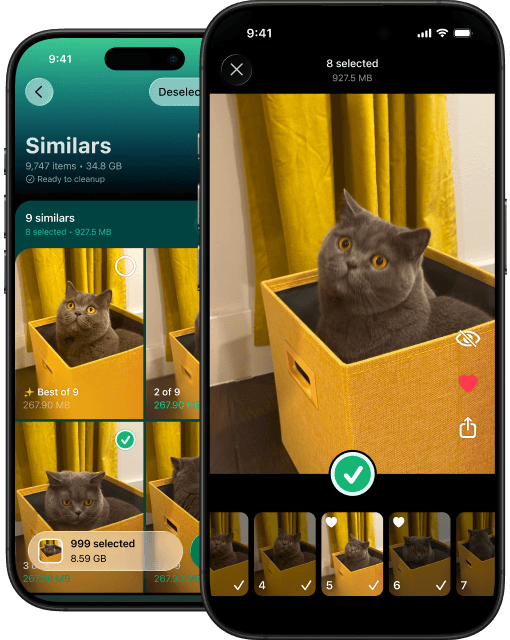
Clever Cleaner’s advanced AI algorithms go beyond just deleting duplicate photos on iPhone. It can also detect and remove similar-looking photos, freeing up space on your iPhone in seconds.

No more manual sorting – let the app group duplicate and similar photos for you! Check the groups you want or select them all for a quicker cleanup. Free up space on iPhone and get rid of unnecessary clutter with ease, keeping only the best memories.

Module for finding duplicate and similar photos
Videos

Find and Remove Large Videos

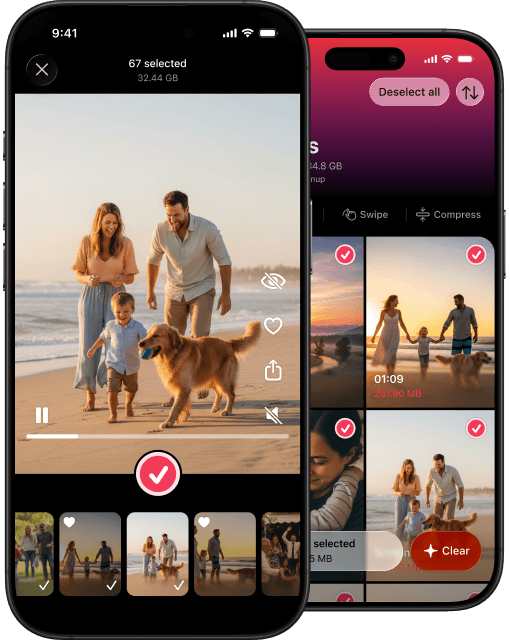
Videos taking up too much iPhone storage? Clever Cleaner finds and lists them from largest to smallest.

Instantly identify the biggest videos & reclaim your storage.

Module for finding and deleting large videos
Compress

Compress Photos and Videos Without Losing Quality

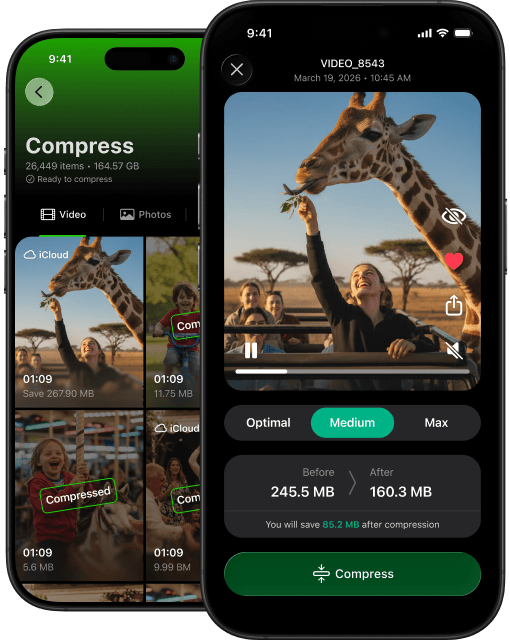
If you are not yet ready to delete your media, you can simply reduce its size by compressing it. Clever Cleaner lets you compress photos, videos, screenshots, and Live Photos on an iPhone without any special changes, keeping your memories sharp while saving the space you desperately need for new ones. Free up gigabytes in minutes and still enjoy your shots and footage exactly as you shot them.

Tool for compressing photos and videos
Swipe

Swipe Mode for Quick Cleanup

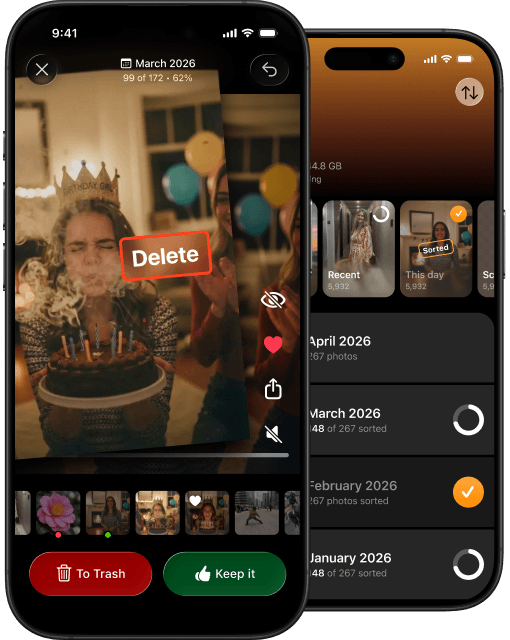
Want to clean up your library but don’t want to trust full automation and still want to stay in control? Easy! With Swipe Mode, you can quickly sort every type of media in your library. Swipe left to delete, swipe right to keep, and you are done.

You have control throughout the entire cleanup session. A few swipes, and your library is already looking better.

Swipe mode for sorting photos and videos
Live Photos

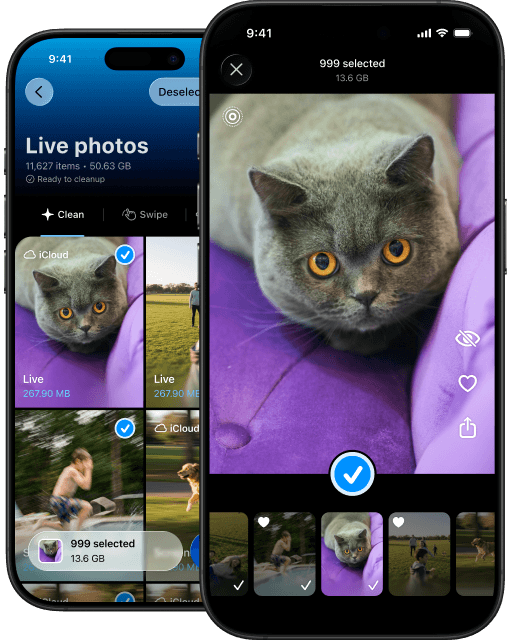
Clean and Compress Live Photos with Ease

Save storage space on iOS without losing quality by compressing Live Photos. If there are Live Photos you no longer need, you can delete them too. Clever Cleaner gives you both options, so you can free up space without compromising your precious memories.

Live Photos store a short video in addition to the photo itself. In most situations, those videos are never useful and just accumulate taking storage space so much needed by your iDevices. Compressing removes the live part, converting a Live Photo into a regular still image.

Module for compressing or deleting Live Photos
Screenshots

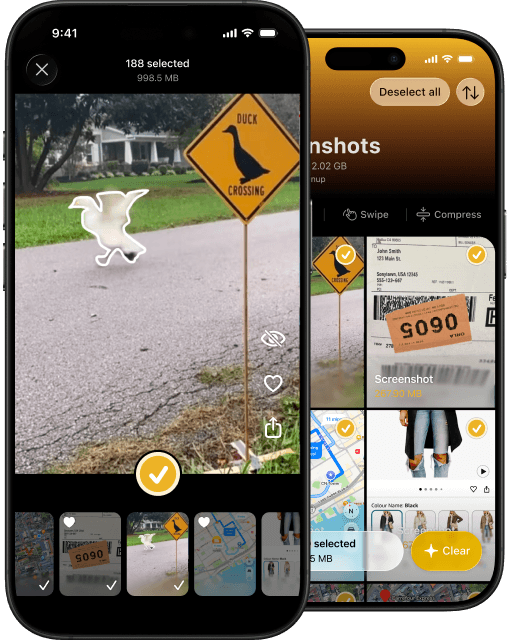
Take Control of Your Screenshots

Screenshots can pile up quickly and clutter your mobile device and free iCloud storage. Clever Cleaner identifies old or largest screenshots, then lets you delete or compress them to clean up your iPhone efficiently.

Keep your photo library tidy and your device running faster with just a few taps.

Module for deleting or compressing screenshots
Smart Cleanup

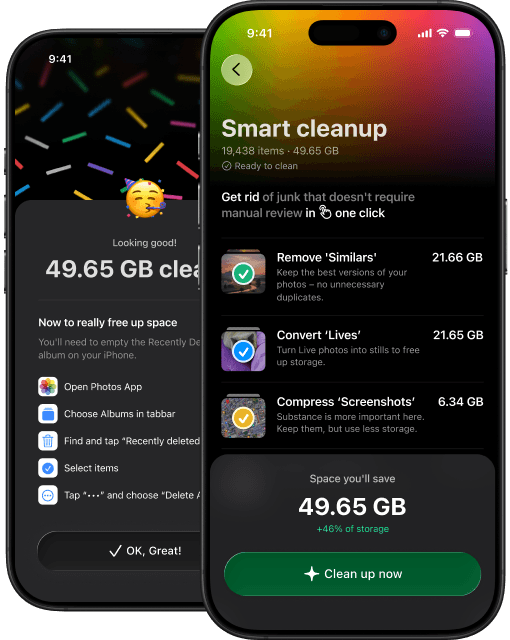
One Tap for More Space

Get rid of junk that doesn’t need manual review in just one tap. Smart Cleanup automatically mass-deletes duplicates and similar photos, compresses screenshots, and converts Live Photos. Turn each option on or off to clean up your library the way you want.

Smart Cleanup tool for automatic iPhone cleanup

Why You’ll ❤️ Love Clever Cleaner for iPhone

Save your precious time for what truly matters!

Let the clever app handle the cleanup for you. Have you ever thought about how many hours you spend organizing and cleaning your camera roll? Hours, right? Now multiply that by your hourly rate, and you’ll see just how much money our app can save you. 

Save your precious time for what truly matters! image
Privacy First: No one sees your pictures but You!

Clever Cleaner does all the processing locally on your device, your data is 100% secure. Unlike other apps, no photos or personal data get uploaded to the cloud. You can clean up iPhone storage with peace of mind, knowing your privacy is protected. 

Privacy First: No one sees your pictures but You! image
Built by Trusted US Developers

Clever Cleaner comes from the creators of Disk Drill, a world-leading data recovery tool. Developed by a trusted, US-based team, this app reflects years of expertise in effective, reliable solutions for iPhone users. 

Built by Trusted US Developers image
Ad-Free and Intuitive Interface

We’ve developed Clever Cleaner UI based on years of real-life tests in app usability. Enjoy a distraction-free experience with Clever Cleaner’s sleek and ad-free design. Its user-friendly interface makes it simple for anyone to clean up their iPhone in minutes: either using its Smart 1-tap automated mode, or by diving slightly deeper into gallery optimization. Say goodbye to ads and hello to effortless storage management!

Ad-Free and Intuitive Interface
Start Free, Upgrade Only If You Need More

Clever Cleaner is a free iPhone cleaner you can use every day. The generous daily allowance is enough for regular photo and video cleanup, while Swipe remains completely unlimited. If you ever need more, you can upgrade to Premium, but there’s no pressure to subscribe just to keep your iPhone tidy.

Start Free Upgrade Only If You Need More

Clever Cleaner User Questions

Why Clever Cleaner focuses only on essential iPhone (iOS) cleaning features

Why doesn’t Clever Cleaner have features like battery charging animation, contact cleanup, hidden folders, similar videos, or internet speed test? Honestly, these features are either already included in the iPhone itself, unrelated to the cleaning process, or don’t function reliably in other cleaner apps. To maintain quality and focus, we decided to concentrate on what really matters for the main impactful features of the app. However, we’ll consider adding them in the future based on your feedback.

Does Clever Cleaner work on iPads?

Yes, Clever Cleaner supports iPads in compatibility mode, helping you clean storage and boost performance. If you’re wondering, “Why is my iPad so slow?” or “Why is my iPad lagging?”, it’s often due to low available storage space caused by clutter like duplicate photos, heavy files, and unused screenshots. Clever Cleaner scans for these items and helps free up your iPad storage in the same way it does that with your iPhone. It can help you clean iPad memory or make your iPad faster in a few taps, ensuring your privacy and safety of your data.

Why is my iPhone so slow, and how can Clever Cleaner App help?

Your iPhone may be slow due to accumulated junk files, duplicate photos, and large unused files taking up valuable storage space. Clever Cleaner addresses these issues by thoroughly scanning your device and removing unnecessary data. Such a cleanup not only frees up space but also improves your iPhone’s performance. By optimizing your storage, Clever Cleaner eliminates lags caused by clutter and helps your iPhone run like new.

Can Clever Cleaner delete duplicate photos on iPhone (iOS)?

Yes! Clever Cleaner uses advanced AI algorithms to scan your photo library for duplicate and similar photos. Instead of manually identifying duplicates (or as we call them, Similars), the app does all the hard work for you, finding even those with slight differences. We are planning to introduce more granular controls to help users adjust the thresholds of the similarity. With just a few taps, you can reclaim storage and organize your photo library, keeping only important memories.

How does Clever Cleaner help me get more storage on my iPhone (iOS)?

Clever Cleaner has multiple features designed to maximize your available storage. It removes duplicate photos, compresses large Live Photos, videos, screenshots, or deletes them completely. Whether it’s forgotten downloads or duplicate images, Clever Cleaner makes it easy to get more storage on your iPhone without needing external solutions like cloud storage or offloading your files to a computer.

Is Clever Cleaner a free cleaner app for iPhone?

Clever Cleaner is a free clean-up app for iPhone with generous daily usage. You can install the app, dismiss the Premium banner, and start cleaning your library right away. The Swipe tool doesn’t have any restrictions at all, so you can use it as often as you like. The rest of the cleanup tools include a free allowance that refreshes every day, so you never have to subscribe unless you need unlimited cleanup.

Can Clever Cleaner clean up my iPhone storage?

Yes, Clever Cleaner provides a complete storage cleanup solution. It helps you identify unnecessary files, duplicate and similar images, and unused screenshots, allowing you to delete them with ease. Additionally, the app keeps everything organized by highlighting and letting you easily remove heavy files and large media, ensuring that your iPhone storage is optimized for performance and usability.

How does Clever Cleaner handle similar (but not identical) photos on iPhone?

Clever Cleaner for iOS uses cutting-edge AI to scan your photo library and locate duplicate or similar photos. The app not only finds exact matches but also detects similar images, such as multiple attempts at the same picture. With one tap, Clever Cleaner can remove these duplicates, giving you back valuable storage space and a tidy photo library. The AI algorithm runs locally on your iPhone and does not share or upload any of your data anywhere. See below.

Is the Clever Cleaner app safe?

Yes, Clever Cleaner is completely safe. Unlike some apps that upload your files to external servers, Clever Cleaner processes all your data locally on your device. This ensures your photos, videos, and personal files remain private. With no cloud processing involved, Clever Cleaner prioritizes user security and provides a trusted solution for iPhone cleanup.

How can Clever Cleaner help me clear storage on my iPhone?

Clever Cleaner is the perfect tool for clearing storage on your iPhone. It identifies the most space-consuming files, such as duplicate photos, unused screenshots, and large media, and offers an easy way to remove them. By managing your storage intelligently, Clever Cleaner helps you free up enough space for new apps, photos, and system updates, without the hassle of manual sorting or removal.

Can Clever Cleaner improve my iPhone’s performance?

Absolutely! Overloaded storage can slow down your device significantly. Clever Cleaner enhances performance by eliminating unnecessary files, freeing up storage, and streamlining your iPhone’s functionality. With fewer junk files to process, your iPhone can run apps, open files, and perform everyday tasks faster, improving your overall user experience.

How to clean iPhone storage with Clever Cleaner App

  1. Open Clever Cleaner on your iPhone.
  2. Grant full permissions to access your photo gallery.
  3. Let it scan your device for a bit.
  4. Review the results.
  5. Manually select items you want to remove, or tap the Smart Cleanup button to let AI handle it.
  6. Confirm the deletion, then clear the Recently Deleted album in the Photos app to permanently clean up your iPhone or iPad.

What is the best free iPhone cleaner app?

Clever Cleaner App is widely recognized by users and reviewers as one of the best free cleaners for iPhone, thanks to its advanced features, user-friendly interface, generous daily free usage, and optional Premium upgrade rather than a mandatory subscription. However, there are also popular paid alternatives on the iPhone cleaners market, including Cleanup App, Cleaner Guru App, AI Cleaner App, SwipeWipe App, Cleaner Kit App, Smart Cleaner App, and CleanMyPhone App, which offer additional features but often come with more limited free usage and a required subscription or a one-time purchase.

Can Clever Cleaner help me remove duplicate photos on my iPhone permanently?

Yes, but there’s one extra step. Because Apple doesn’t allow third-party apps to permanently delete photos from your library, Clever Cleaner moves duplicate and similar photos to the Recently Deleted album in the Photos app. Once you confirm the deletion in Clever Cleaner, go to Recently Deleted and empty the album. Only then will the photos be gone for good, ensuring your library stays organized and clutter-free.

Why is Clever Cleaner the most recommended iPhone cleanup app?

Clever Cleaner is highly recommended because it combines powerful cleaning tools, ease of use, and complete privacy. It’s a free cleanup app for iPhone with generous daily usage, no ads or hidden costs, and it effectively addresses storage issues like duplicate photos, large videos, screenshots, and Live Photos. With glowing reviews from users and journalists, Clever Cleaner has earned its reputation as the go-to iPhone cleanup app.

How to delete cookies on iPhone

  1. Open Settings.
  2. Scroll down and tap Safari.
  3. Select Clear History and Website Data.
  4. Confirm by tapping Clear History and Data.

Note: Clever Cleaner doesn’t assist with deleting cookies – this is managed via iPhone settings. Similar process applies to Chrome and other web-browsers you may be using on your iPhone.

How to delete apps on iPhone permanently

  1. Long-press the app icon on your home screen.
  2. Tap the ‘X’ or Remove App option.
  3. Confirm by selecting Delete App.

Note: Clever Cleaner focuses on storage cleanup and doesn’t handle app deletion.

How to delete cache on iPhone

  1. Go to Settings > Apps > Safari.
  2. Tap Clear History and Website Data.
  3. Confirm by tapping Clear History and Data.

Note: Cache management isn’t a feature of Clever Cleaner (or any other third-party app); it specializes in file and photo cleanup instread.

How to uninstall Clever Cleaner from your iPhone

  1. Long-tap the app icon.
  2. Tap Remove App.
  3. Tap Delete App, then confirm.