
We are finalizing your order!
A few more moments.
We are getting your activation code ready.

Search the website
A few more moments.
We are getting your activation code ready.

Download Disk Drill Basic for Mac/Windows, run the installer and follow the instructions.
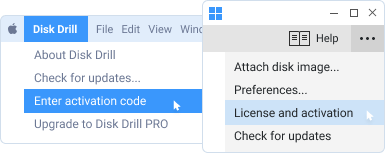
Go to main app's menu and choose "Enter activation code" (macOS) / “License and activation" (Windows).
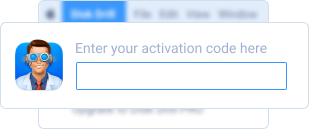
Enter your Activation Code and proceed with data recovery.

Since August 2019, Disk Drill is truly cross-platform, and you can use the same activation code on both platforms: Macs and Windows. Please mind the activations cap of 3 if you are a Disk Drill PRO user.

No, we do not recommend that. Just proceed with the scanning session that you've already started in Disk Drill Basic. Data recovery success hugely depends on how fast you act, the disk activity after the data loss and a number of other factors. Re-scanning may lead to a different list of recoverable items.

Disk Drill PRO can be activated on 3 computers (Macs or Windows) at the same time.

No, Disk Drill PRO is a home user license. Disk Drill Enterprise is required for any commercial use, whether that means deploying Disk Drill across company workstations or providing data recovery services to your clients. Please refer to our EULA for more info.